


人工智慧產業正在經歷快速發展。它們令人印象深刻,但也常常令人困惑。
我一直在學習、鑽研資料科學領域,並打好基礎,因為我相信資料科學的未來與生成式人工智慧的發展密切相關。
彷彿就在昨天,我建立了我的第一個AI 代理,兩週後,就有瞭如此多的 Python 套件可供選擇,更不用說像n8n這樣無需程式碼就能取得非常好效果的選項了。

從能夠與我們聊天的簡單模型,到無所不在、搜尋網路、處理文件、執行整個資料科學專案(從初始資料探索到建模和評估)的人工智慧代理的海嘯,這一切都發生在短短幾年內。
什麼?
看到這一切,我的想法是:「我必須盡快加入。」畢竟,乘風破浪總比被浪潮裹挾要好。
因此,我決定開始這個系列文章,計劃從基礎知識入手,逐步建立我們的第一個人工智慧代理,然後再深入探討更複雜的概念。
話不多說,我們開始吧。
人工智慧代理基礎知識
當我們賦予大型語言模型 (LLM) 與工具互動並為我們執行有用操作的能力時,人工智慧代理就誕生了。它不再只是一個聊天機器人,而是可以安排預約、管理我們的日曆、搜尋網路、撰寫社群媒體貼文等等……這種轉變使其成為一個功能齊全的數位助理。
依賴人工智慧的智能體不僅可以聊天,還可以做很多有用的事情。
但是,我們如何賦予大型語言模型(LLM)這種能力呢?
最簡單的辦法是使用應用程式介面 (API) 與大型語言模型互動。現在有很多 Python 套件可以實現這個目的。如果你有在關注我的博客,你會發現我已經嘗試過兩個用於創建代理的包:例如 Langchain 和 Agno(以前稱為 PhiData)以及 CrewAI。對於這個鏈,我將繼續使用 Agno [1]。
首先,使用以下方法設定虛擬環境 uv 或使用 Anaconda,或是你偏好的其他環境處理器。然後,安裝軟體包。
# Agno AI
pip install agno

# module to interact with Gemini
pip install google-generativeai

# Install these other packages that will be needed throughout the tutorial
pip install agno groq lancedb sentence-transformers tantivy youtube-transcript-api在繼續之前請注意:不要忘記取得 Google Gemini API 金鑰 [2]。
創建一個簡單的代理非常容易。所有包都非常相似,它們都有一個類別。 Agent 或者類似的方法,使我們能夠定義一個模型,並開始與我們選擇的更大的語言模型互動。此類方法的主要組成部分如下:
model連接到大型語言模型。這裡我們將從 OpenAI、Gemini、Llama、Deepseek 等模型中進行選擇。description這論證使我們能夠描述智能體的行為。這被添加到system_message它是一種類似的中間體。instructions我喜歡把代理人想像成我們管理的員工或助理。為了完成任務,我們必須提供操作說明。在這裡,你可以做到這一點。expected_output在這裡我們可以提供有關預期輸出的說明。tools這使得大型語言模型成為一個代理,使其能夠使用這些工具與現實世界互動。
現在,讓我們創建一個沒有工具的簡單代理,但它將有助於我們建立對程式碼結構的直覺。
# Imports
from agno.agent import Agent
from agno.models.google import Gemini
import os

# Create agent
agent = Agent(
    model= Gemini(id="gemini-1.5-flash",
                  api_key = os.environ.get("GEMINI_API_KEY")),
    description= "An assistant agent",
    instructions= ["Be sucint. Answer in a maximum of 2 sentences."],
    markdown= True
    )

# Run agent
response = agent.run("What's the weather like in NYC in May?")

# Print response
print(response.content)
############ 導演 ###############
紐約五月預計氣溫溫和,通常在華氏50度到70度之間。可能會下雨,所以建議穿多層衣物並帶傘。
太好了。我們使用的是 Gemini 1.5 模型。請注意它如何根據訓練資料做出反應。如果我們讓它告訴我們今天的天氣,它回覆說無法上網。
讓我們來探討這些論點。 instructions 和 expected_output我們現在想要一個表格,顯示紐約市(NYC)的月份、季節和平均溫度。
# Imports
from agno.agent import Agent
from agno.models.google import Gemini
import os

# Create agent
agent = Agent(
    model= Gemini(id="gemini-1.5-flash",
                  api_key = os.environ.get("GEMINI_API_KEY")),
    description= "An assistant agent",
    instructions= ["Be sucint. Return a markdown table"],
    expected_output= "A table with month, season and average temperature",
    markdown= True
    )

# Run agent
response = agent.run("What's the weather like in NYC for each month of the year?")

# Print response
print(response.content)
這就是結果。
| 這個月 | 季節 | 平均溫度(華氏) |
|---|---|---|
| 一月 | 冬天 | 32 |
| 二月 | 冬天 | 35 |
| 遊行 | 春天 | 44 |
| 四月 | 春天 | 54 |
| 可能 | 春天 | 63 |
| 六月 | 夏天 | 72 |
| 七月 | 夏天 | 77 |
| 八月 | 夏天 | 76 |
| 九月 | 秋天 | 70 |
| 十月 | 秋天 | 58 |
| 十一月 | 秋天 | 48 |
| 十二月 | 冬天 | 37 |
工具
之前的答案都不錯,但我們當然不想使用功能強大的大型語言模型(LLM)來玩聊天機器人或告訴我們一些過時的消息,對吧?
我們希望它能成為連結自動化、生產力和知識的橋樑。因此,這些工具將增強我們人工智慧代理的功能,從而建立起與現實世界的橋樑。代理工具的常見範例包括:網路搜尋、SQL 執行、電子郵件傳送或 API 呼叫。
但更重要的是,我們可以使用任何 Python 函數作為工具,為我們的代理程式創建客製化功能,從而為與不同系統和流程的整合開闢廣闊的可能性。
工具是代理可以運行以完成任務的功能。
從程式碼角度來看,為代理程式新增工具只需使用對應的參數即可。 tools 在類別中 Agent.
想像一下,一位從事健康養生行業的個體戶(一人經營)想要實現內容創作自動化。他每天都會發布一些健康生活小貼士。我知道內容創作遠沒有聽起來那麼簡單,它需要創意、研究和文案撰寫技巧。所以,如果能夠實現內容創作的自動化,或至少自動化其中一部分,就能節省大量時間。
因此,我們編寫了這段程式碼,創建一個非常簡單的代理,它可以創建一個簡單的 Instagram 貼文並將其儲存為 Markdown 檔案以供審核。我們將流程從「思考 > 搜尋 > 撰寫 > 審核 > 發布」簡化為「審核 > 發布」。
# Imports
import os
from agno.agent import Agent
from agno.models.google import Gemini
from agno.tools.file import FileTools

# Create agent
agent = Agent(
    model= Gemini(id="gemini-1.5-flash",
                  api_key = os.environ.get("GEMINI_API_KEY")),
                  description= "You are a social media marketer specialized in creating engaging content.",
                  tools=[FileTools(
                      read_files=True,
                      save_files=True
                      )],
                  show_tool_calls=True)


# Writing and saving a file
agent.print_response("""Write a short post for instagram with tips and tricks
                        that positions me as an authority in healthy eating
                        and save it to a file named 'post.txt'.""",
                     markdown=True)
因此,我們得到以下結果。
透過食用健康食品釋放你的正能量:
1. 優先選擇天然食物:多吃水果、蔬菜、瘦蛋白質和全穀物。它們營養豐富,能讓你保持飽足感和精力充沛。
2. 用心進食:注意身體發出的飢餓和飽足訊號。進食時避免分心。
3. 多喝水:水對消化、能量水平和整體健康至關重要。
4. 不要過度節制:偶爾吃點甜食也無妨。過度節制會導致之後暴飲暴食。凡事都要適度享受!
5. 提前規劃:提前準備好你的餐點或零食,避免做出不健康的選擇。
#健康飲食 #健康生活方式 #營養 #美食愛好者 #健康與養生 #健康貼士 #清潔飲食 #減肥 #健康食譜 #營養貼士 #快速健康 #健康食品 #正念飲食 #健康之旅 #健康教練
當然,我們可以透過組建一個團隊來增加複雜性,團隊成員包括其他代理人,負責在網站列表中搜尋內容,一名內容審核員和編輯,以及另一名負責為帖子創建圖片。但我認為您應該已經大致了解如何添加內容了。 tool إ Agent.
我們也可以再增加一種工具: 一個工具 該函數(函數工具)我們可以使用 Python 函數作為大型語言模型 (LLM) 的工具。只需不要忘記添加類型提示,例如 ```。 video_id:str這是必要的,這樣模型才能知道函數將使用哪個輸入。否則,可能會出現錯誤。
我們簡單看一下它是如何運作的。
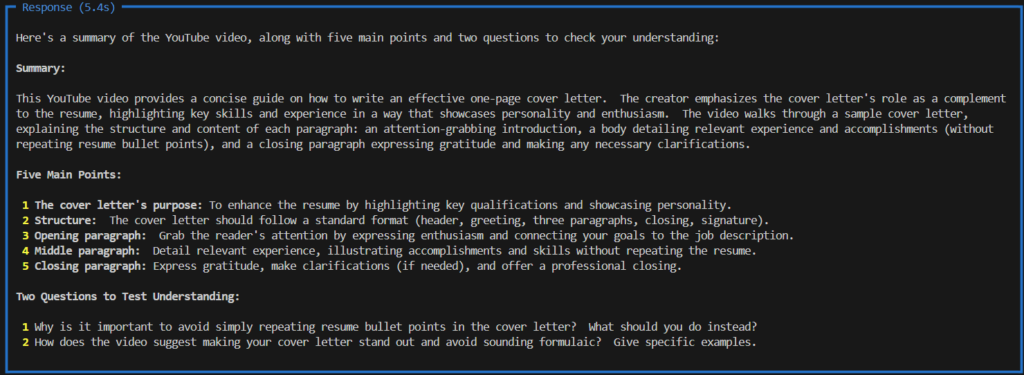
現在,我們希望代理商能夠檢索特定的 YouTube 影片並產生摘要。為了實現這一目標,我們只需建立一個函數,該函數從 YouTube 下載影片並將其傳遞給表單進行摘要生成。
# Imports
import os
from agno.agent import Agent
from agno.models.google import Gemini
from youtube_transcript_api import YouTubeTranscriptApi

# Get YT transcript
def get_yt_transcript(video_id:str) -> str:

    """
    Use this function to get the transcript from a YouTube video using the video id.

    Parameters
    ----------
    video_id : str
        The id of the YouTube video.
    Returns
    -------
    str
        The transcript of the video.
    """

    # Instantiate
    ytt_api = YouTubeTranscriptApi()
    # Fetch
    yt = ytt_api.fetch(video_id)
    # Return
    return ''.join([line.text for line in yt])


# Create agent
agent = Agent(
    model= Gemini(id="gemini-1.5-flash",
                  api_key = os.environ.get("GEMINI_API_KEY")),
                  description= "You are an assistant that summarizes YouTube videos.",
                  tools=[get_yt_transcript],
                  expected_output= "A summary of the video with the 5 main points and 2 questions for me to test my understanding.",
                  markdown=True,
                  show_tool_calls=True)


# Run agent
agent.print_response("""Summarize the text of the video with the id 'hrZSfMly_Ck' """,
                     markdown=True)
然後你就能得到結果。
具有推理能力的智能體
Agno 套件的另一個亮點在於能夠創建在回答問題之前即可分析情況的智能體。這是一種推理工具。請查看AI 智能體的類型及其用途:詳細說明。
我們將使用阿里巴巴的Qwen-qwq-32b模型建立一個推理代理。需要注意的是,除了模型之外,這裡唯一的區別是我們添加了相應的工具。 ReasoningTools()該工具使智能體能夠在提供答案之前進行邏輯思考。
財產是指 adding_instructions=True 向代理人提供詳細說明可以提高他們使用該工具的可靠性和準確性。設定此屬性會導致 False 這迫使智能體依賴自身的推理,而這種推理可能更容易出錯。這使得我們可以對模型的性能進行獨立評估。
# Imports
import os
from agno.agent import Agent
from agno.models.groq import Groq
from agno.tools.reasoning import ReasoningTools


# Create agent with reasoning
agent = Agent(
    model= Groq(id="qwen-qwq-32b",
                  api_key = os.environ.get("GROQ_API_KEY")),
                  description= "You are an experienced math teacher.",
                  tools=[ReasoningTools(add_instructions=True)],
                  show_tool_calls=True)


# Writing and saving a file
agent.print_response("""Explain the concept of sin and cosine in simple terms.""",
                     stream=True,
                     show_full_reasoning=True,
                     markdown=True)
以下是輸出結果。
知識淵博的代理人
此工具是建立產生增強檢索 (RAG) 系統的最簡單方法。借助此功能,您可以讓智能體存取一個或多個網站,它會將內容新增至向量資料庫。之後,這些內容即可被搜尋。當被問及時,智能體可以將這些內容作為其回應的一部分。這項技術提高了人工智慧回應的準確性和可靠性。
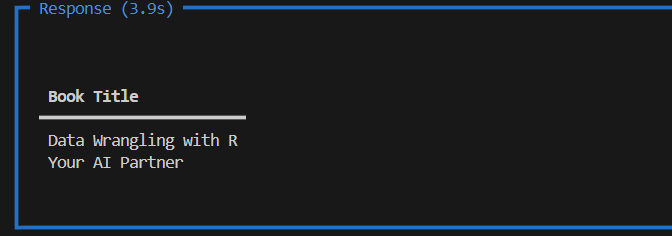
在這個簡單的例子中,我添加了我網站上的一個頁面,並向經紀人詢問了該頁面上列出的書籍。這說明了經紀人如何存取和使用這些資訊。
# Imports
import os
from agno.agent import Agent
from agno.models.google import Gemini
from agno.knowledge.url import UrlKnowledge
from agno.vectordb.lancedb import LanceDb, SearchType
from agno.embedder.sentence_transformer import SentenceTransformerEmbedder

# Load webpage to the knowledge base
agent_knowledge = UrlKnowledge(
    urls=["https://gustavorsantos.me/?page_id=47"],
    vector_db=LanceDb(
        uri="tmp/lancedb",
        table_name="projects",
        search_type=SearchType.hybrid,
        # Use Sentence Transformer for embeddings
        embedder=SentenceTransformerEmbedder(),
    ),
)

# Create agent
agent = Agent(
    model=Gemini(id="gemini-2.0-flash", api_key=os.environ.get("GEMINI_API_KEY")),
    instructions=[
        "Use tables to display data.",
        "Search your knowledge before answering the question.",
        "Only inlcude the content from the agent_knowledge base table 'projects'",
        "Only include the output in your response. No other text.",
    ],
    knowledge=agent_knowledge,
    add_datetime_to_instructions=True,
    markdown=True,
)

if __name__ == "__main__":
    # Load the knowledge base, you can comment out after first run
    # Set recreate to True to recreate the knowledge base if needed
    agent.knowledge.load(recreate=False)
    agent.print_response(
        "What are the two books listed in the 'agent_knowledge'",
        stream=True,
        show_full_reasoning=True,
        stream_intermediate_steps=True,
    )
配備記憶功能的代理人
本文將討論的最後一種類型是記憶體代理,它是人工智慧代理領域的一個基本概念。
這類智能體能夠儲存和檢索過往互動中的使用者相關訊息,從而了解使用者偏好並調整回應方式。這種記憶功能使智能體在後續互動中更有效率。
我們來看一個例子,我會告訴智能體一些訊息,並根據這些互動請求推薦。這說明了具備記憶功能的智能體如何改善使用者體驗。
# imports
import os
from agno.agent import Agent
from agno.memory.v2.db.sqlite import SqliteMemoryDb
from agno.memory.v2.memory import Memory
from agno.models.google import Gemini
from rich.pretty import pprint

# User Name
user_id = "data_scientist"

# Creating a memory database
memory = Memory(
    db=SqliteMemoryDb(table_name="memory",
                      db_file="tmp/memory.db"),
    model=Gemini(id="gemini-2.0-flash",
                 api_key=os.environ.get("GEMINI_API_KEY"))
                 )

# Clear the memory before start
memory.clear()

# Create the agent
agent = Agent(
    model=Gemini(id="gemini-2.0-flash", api_key=os.environ.get("GEMINI_API_KEY")),
    user_id=user_id,
    memory=memory,
    # Enable the Agent to dynamically create and manage user memories
    enable_agentic_memory=True,
    add_datetime_to_instructions=True,
    markdown=True,
)


# Run the code
if __name__ == "__main__":
    agent.print_response("My name is Gustavo and I am a Data Scientist learning about AI Agents.")
    memories = memory.get_user_memories(user_id=user_id)
    print(f"Memories about {user_id}:")
    pprint(memories)
    agent.print_response("What topic should I study about?")
    agent.print_response("I write articles for Towards Data Science.")
    print(f"Memories about {user_id}:")
    pprint(memories)
    agent.print_response("Where should I post my next article?")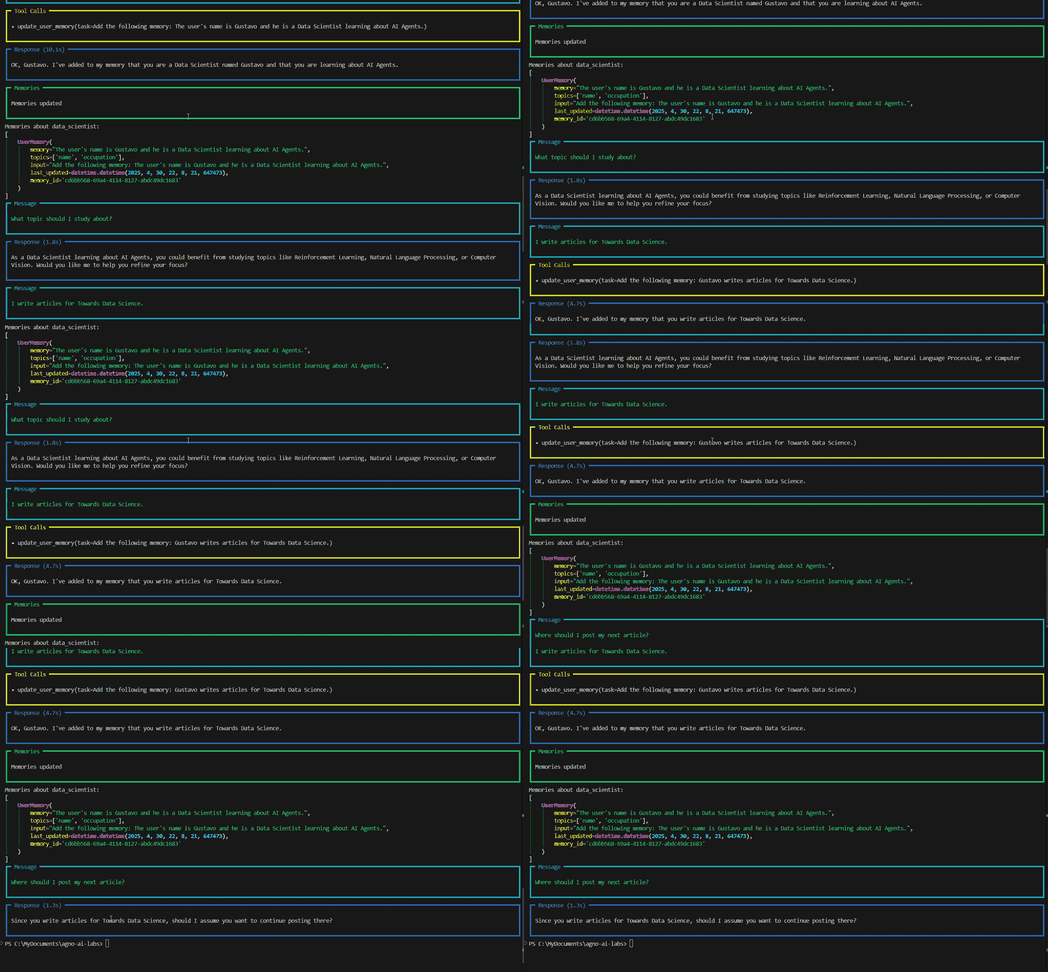
至此,我們關於人工智慧代理的第一篇文章就結束了。我們希望這篇文章能為讀者提供不同類型人工智慧代理的有用概述。
離開前
這篇文章包含大量資訊。我們已經邁出了學習人工智慧代理的第一步。我知道這可能會讓人感到困惑;資訊如此之多,很難知道從哪裡開始以及應該學習什麼。
我的建議是,你不妨效法我的學習方法。循序漸進,先選擇幾個軟體包,例如 Agno 和 CrewAI,深入研究,然後逐步學習如何創建更複雜的智能體。這種循序漸進的方法最有利於掌握複雜的 AI 概念。
本文從零開始,首先學習如何與大型語言模型(LLM)進行簡單的交互,然後逐步講解如何創建內存智能體,甚至如何為人工智能智能體構建簡單的增強型檢索系統(RAG)。這些基礎技能對於理解人工智慧智能體的工作原理至關重要。
顯然,僅使用一個代理就能完成很多事情。有關進階範例,請參閱參考文獻[4]。
掌握這些簡單的技能,你就能領先許多人,成就非凡。盡情釋放你的創意吧-何樂而不為?透過強大的語言模型,創造出令人驚嘆的作品!使用人工智慧工具來提升你的創造力。
在接下來的文章中,Plus 將學習人工智慧代理及其評估方法。敬請期待!
GitHub 儲存庫
https://github.com/gurezende/agno-ai-labs
審稿人
[1] https://docs.agno.com/introduction
[2] https://ai.google.dev/gemini-api/docs
[3] https://pypi.org/project/youtube-transcript-api/
[4] https://github.com/agno-agi/agno/tree/main/cookbook
[5] https://docs.agno.com/introduction/agents#agent-with-knowledge

評論被關閉。